"How much does it cost to install a server for a small business?" I get this question almost every month, usually right after a client has read a Reddit thread where fifteen people give fifteen different answers, anywhere from €300 to €8,000. The honest answer depends on what "server" actually means for your business, how many workstations need to connect, and whether a physical server is even the right call in 2026. I've been installing this kind of infrastructure for Paris small businesses since 2012, from a law firm near the 8th arrondissement to a real-estate agency in the 16th, and I'd rather give real numbers than vague ranges.
What a small-business server installation actually involves
Most clients picture a "server" as a big tower you plug in that makes everything faster. In practice, the installation covers several pieces that all need to work together: Windows Server itself, promoting it to an Active Directory domain controller (AD DS), an internal DNS service so machines can find each other, DHCP to hand out IP addresses automatically, creating the user accounts and security groups, and finally joining every client PC to the domain. A basic password policy and mapped shared drives usually go in on day one as well.
It's that full chain, not just buying a machine, that explains the price gap between someone plugging in a home NAS on a Saturday and a technician delivering a working, documented domain infrastructure.
Here are the real steps, not the theory
To make this concrete, here are screenshots from an installation I ran recently on a Windows Server lab, following the same steps I use on a client site.
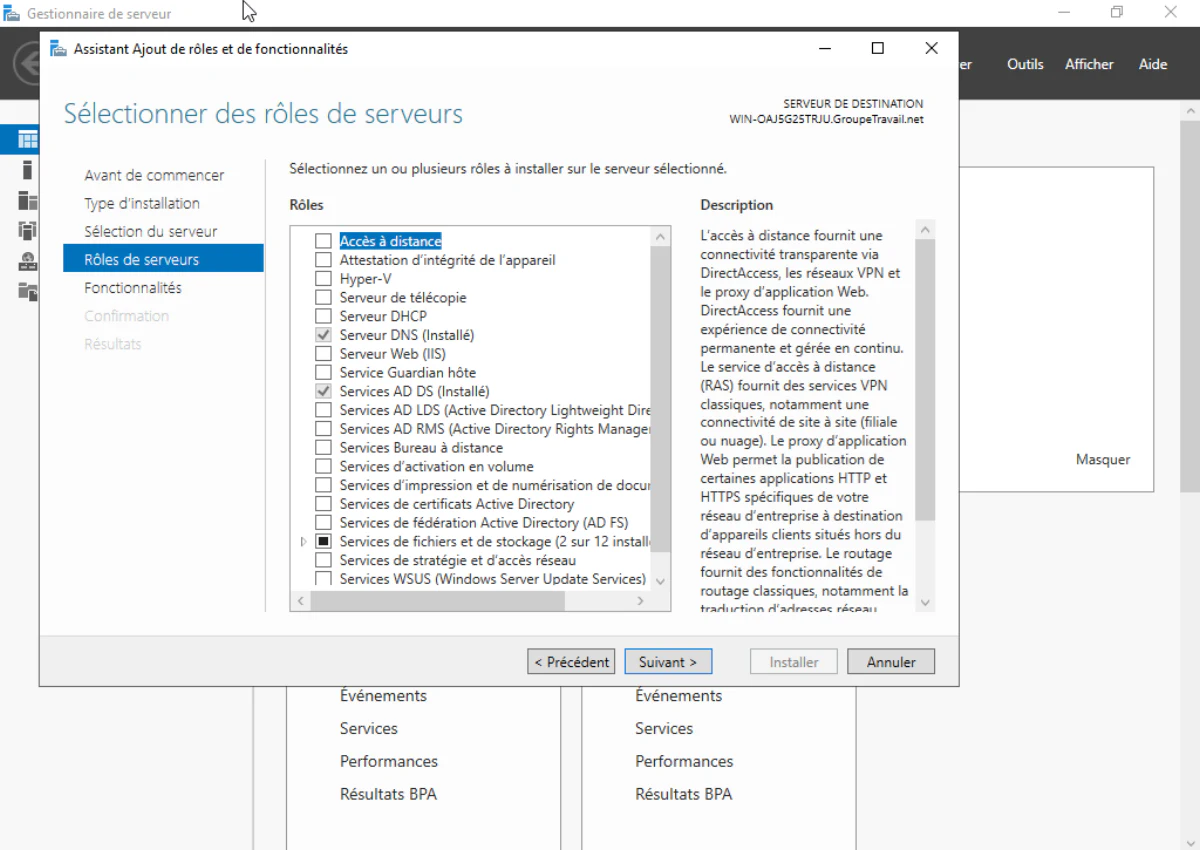
It starts in Server Manager, with the Add Roles wizard. This is where I select the services the future domain controller will need: DNS Server and AD DS, checked in the wizard above, with DHCP added afterward once the domain is stable.
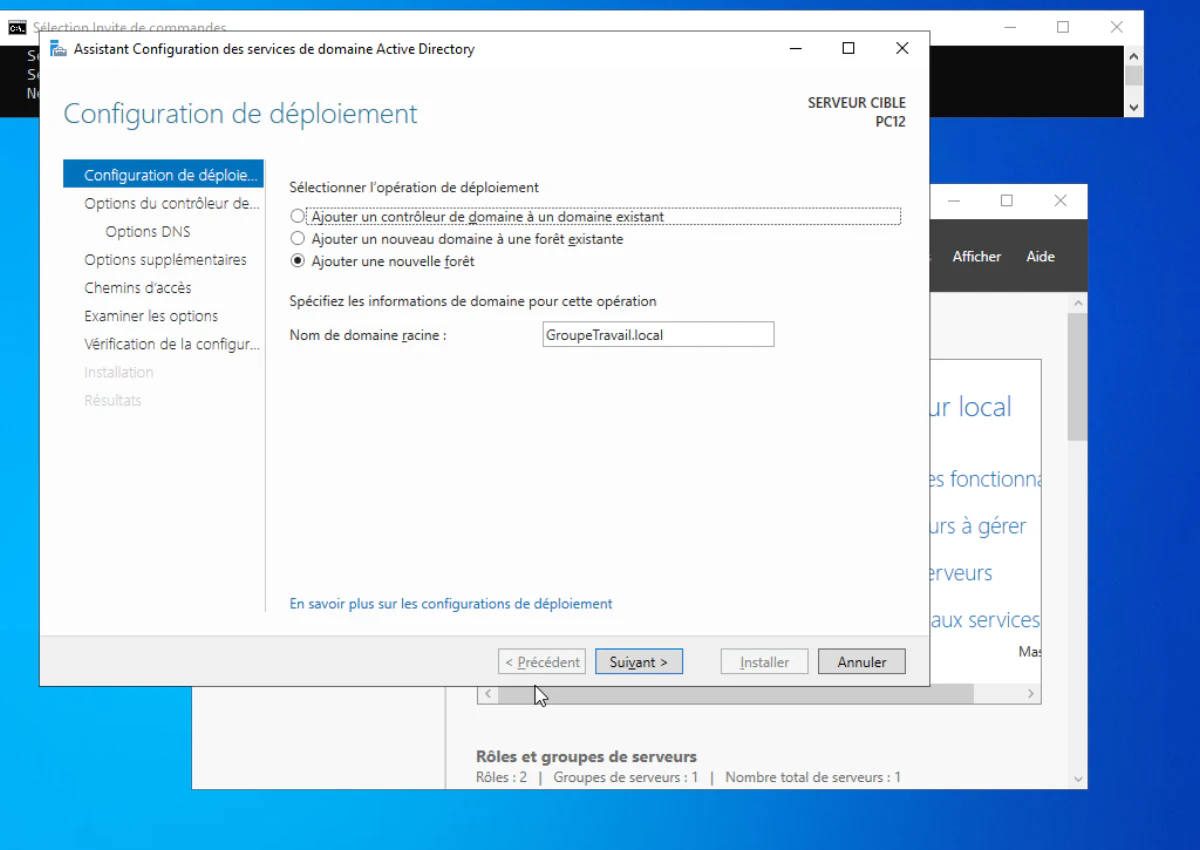
Next comes the promotion itself. This step turns an ordinary Windows Server into a domain controller: you choose to add a new forest and set the root domain name that will identify the business on the internal network. It restarts the server and isn't something you casually redo, so I always schedule it outside office hours.
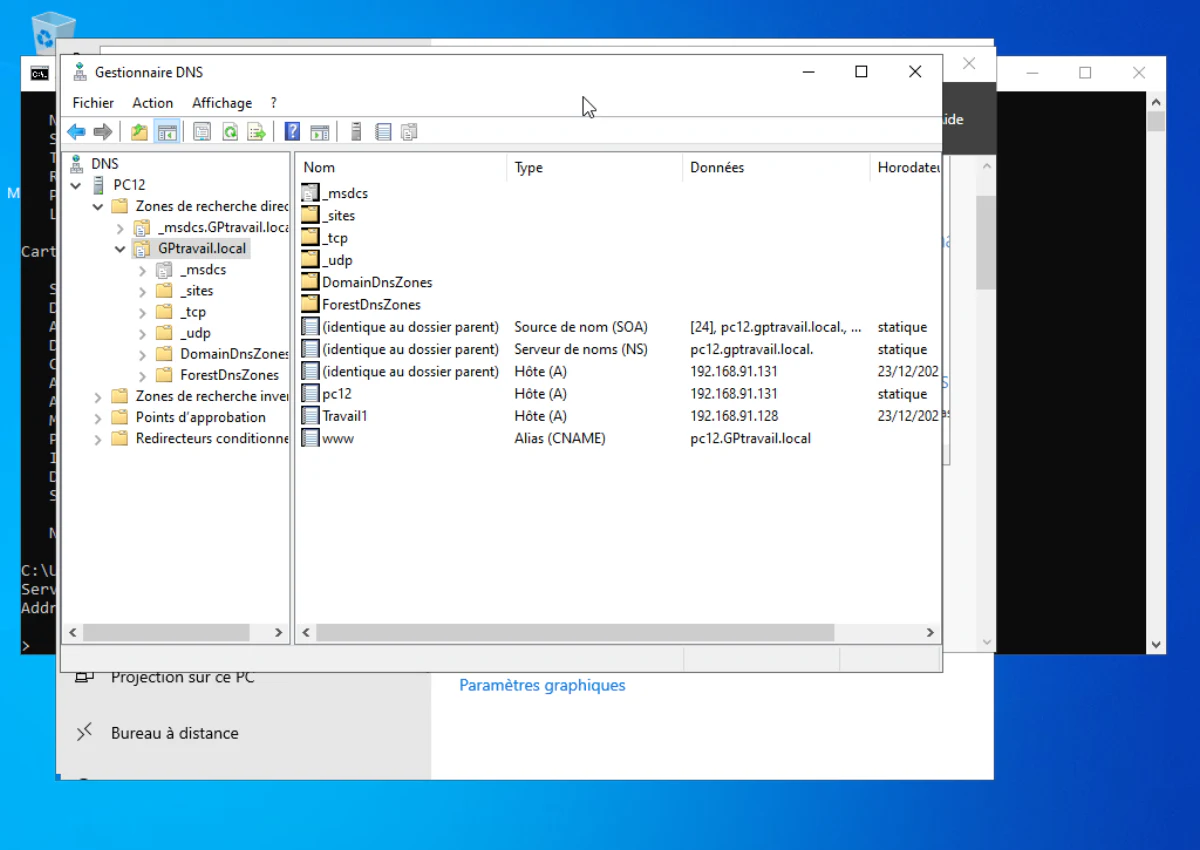
Once the domain is live, DNS Manager shows the matching forward lookup zone. This is where every PC, print server and internal service gets a resolvable name instead of an IP address someone has to remember. In the example above, host records for machines already on the domain appear automatically, along with a CNAME alias for internal web access.
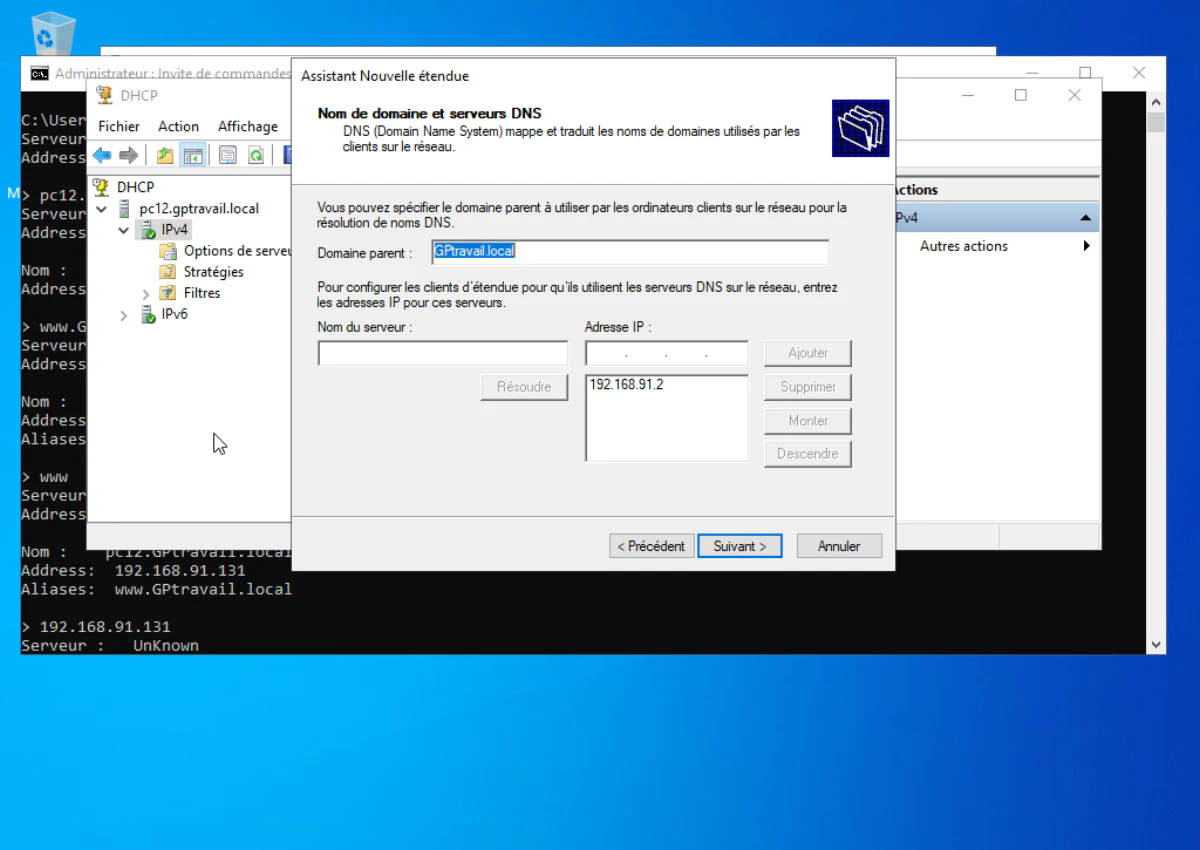
DHCP configuration comes next. This is what avoids manually configuring the IP address on every new PC or printer: the New Scope wizard asks for the parent domain and the DNS server address to hand out automatically to anything that joins the network.
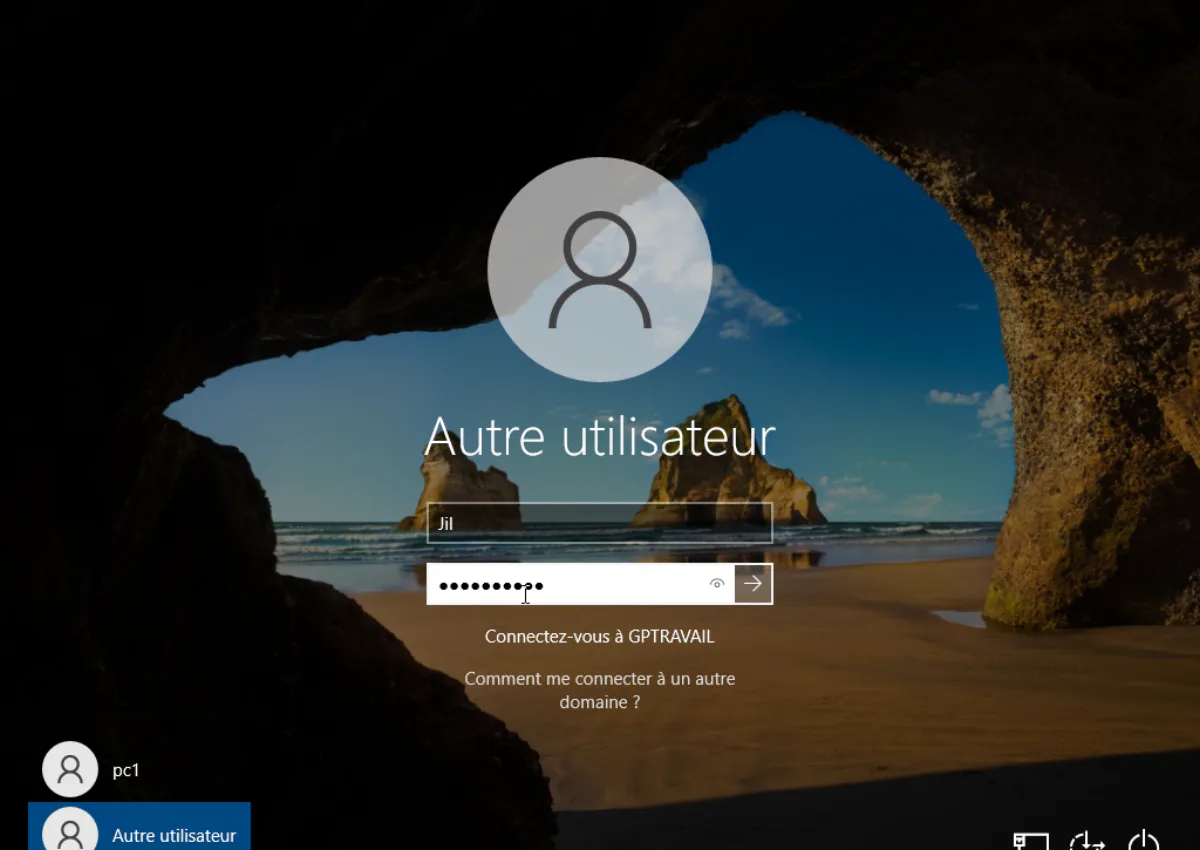
From the user's side, the change shows up right at the sign-in screen. Once a PC is joined to the domain, the employee logs in with a work username and the password set on their account, instead of a local account that only exists on that one machine.
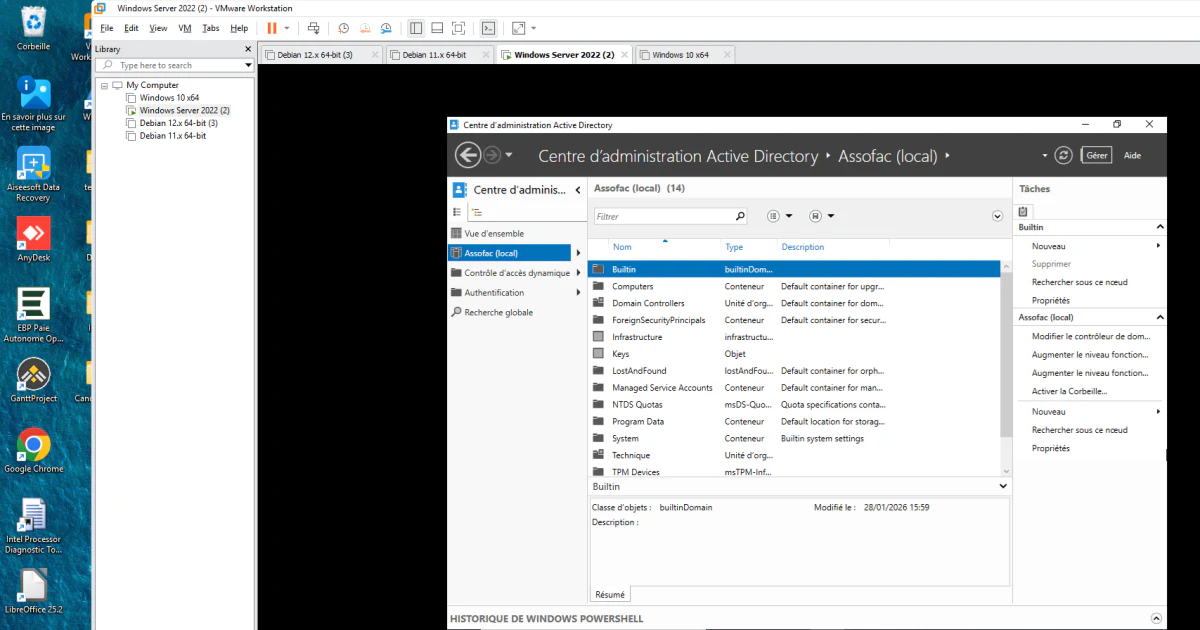
Day-to-day account management runs through the Active Directory Administrative Center. This is where I create one account per employee, sort them into the right organisational units, and disable an account the day someone leaves — a security habit many small businesses skip without a server centralising all of it.
Does a small business actually need a server in 2026?
Not always, and I'll say that plainly even though a physical server is more profitable for me. Below roughly 8-10 workstations, without a legacy line-of-business app that requires a local Windows domain, Microsoft 365 paired with Entra ID (formerly Azure AD) often covers the need: centralised accounts, file sharing through OneDrive and SharePoint, security policies applied from the cloud, with no server to run or back up yourself.
A server still earns its keep in cases I see regularly across Paris: legacy line-of-business software that refuses to run without local Active Directory authentication, an accounting or legal firm that needs to keep files on-premises for confidentiality or internal compliance reasons, a shared network printer serving fifteen desks, or simply an unreliable internet connection in some of the older buildings in the 16th or 17th arrondissement, where relying entirely on the cloud becomes a real daily risk.
Realistic pricing in Paris, 2026
These figures are indicative, based on projects I regularly quote for businesses with 5 to 15 workstations, excluding VAT unless stated.
Hardware. A properly sized entry-level tower server runs €1,200 to €2,500. For a very small setup under 6 workstations, I sometimes repurpose a sturdy existing desktop as the server, which brings the hardware cost close to zero if the machine is already there.
Licensing. Windows Server Standard 2022 runs roughly €1,100 to €1,300 for the licence, plus CALs (client access licences) at around €30 to €45 per device or per user depending on the licensing mode chosen.
Labour. For the full installation described above — AD DS promotion, DNS, DHCP, account creation and joining workstations — I typically quote a flat fee of €900 to €1,800 excl. VAT for a 5-15 workstation business, which covers one to two days on site plus preparation beforehand. A larger business or one with specific needs (VPN, redundant file storage, offsite backup) is closer to €2,500 to €4,000.
Maintenance. A monthly support contract covering update monitoring, backup verification and priority response for failures runs €90 to €200 a month depending on fleet size. It's not required the first month, but it's what stops a cleanly delivered server from quietly accumulating unpatched security updates over time.
Overall, for a typical Paris small business with 8-10 workstations starting from scratch, I usually see a total bill between €2,500 and €4,500 all-in — hardware and labour combined — before any monthly maintenance contract.
Timeline
Expect 3 to 7 business days for delivery of ordered server hardware, unless the supplier has a matching model in stock. The installation itself — Windows Server, promotion to domain controller, DNS, DHCP, account creation and joining the first workstations — usually takes 1 to 2 days on site. I always schedule the Active Directory promotion outside office hours, early morning or evening, since it involves a server restart and a brief interruption of the internal network. Joining the remaining PCs and fine-tuning details (printers, shared folders, access rights) can spill into the following week without blocking the business.
FAQ
How much does server installation cost for a small business in Paris?
For a small setup of 5 to 15 workstations, expect between €1,800 and €4,500 all-in for 2026: server hardware, Windows Server licence, user CALs, and labour for installation, domain controller promotion, DNS/DHCP configuration and joining client PCs. A monthly maintenance contract is separate.
Do I really need a physical server, or does the cloud cover it?
Below roughly 8-10 workstations, without a legacy line-of-business app or a requirement to keep data on-site, Microsoft 365 with Entra ID often covers the need without a physical server. A server is still justified for large file shares, software that requires a Windows domain, a shared network printer, or an unreliable internet connection.
How long does a business server installation take?
Expect 3 to 7 business days for hardware delivery once ordered, then 1 to 2 days on site for installing Windows Server, promoting it to a domain controller, configuring DNS/DHCP, creating accounts and joining the workstations. Scheduling the promotion outside office hours avoids disrupting the business.
Do I need a maintenance contract after installing a server?
It is not mandatory but it is recommended. An unmonitored server accumulates overdue updates, backups that fail silently, and stale user accounts. A monthly maintenance plan covers these checks and usually costs less than an emergency call-out after a failure.
If your business is still weighing a local server against a cloud-only setup, or a legacy line-of-business app is forcing your hand toward Active Directory, I can assess the situation before you buy any hardware. It's also worth setting up a small business IT maintenance plan right from installation rather than waiting for the first failure. If an existing server starts failing or slowing down after a few years, IT troubleshooting in Paris can often avoid a full replacement. And if your workstations are still on Windows 10, the recent end of support changes the picture before you even get to servers — see my article on Windows 10 end of support: what to do.